
SafecomLink Email Gateway
Decentralized Email gateway that
works when nothing else does
Connecting V/U/HF and Internet
for two-way email communication
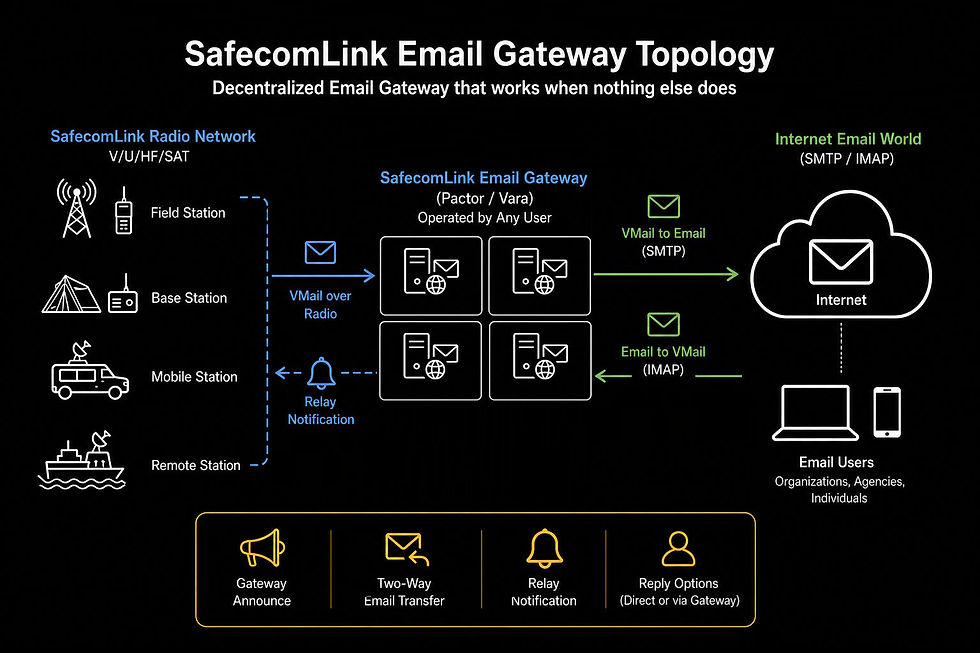
Welcome to a new era of HF communications a decentralized email gateway system that anyone can operate, enabling true two-way email transfer between HF and the Internet.

The SafecomLink Email Gateway provides a critical communication bridge, allowing users to send and receive emails over the HF/VHF/UHF/SAT.
It enables SafecomLink messages to be forwarded to external email addresses via SMTP and, conversely, allows incoming emails to be retrieved via IMAP, converted into VMails, and routed back to SafecomLink users over the radio.
SafecomLink Email Gateway is available in both SafecomLink for Pactor and SafecomLink for Vara, included in the Enterprise and Hamradio packages.
With flexible reply options and a smart redirection mechanism, the Email Gateway ensures seamless bi-directional communication between the SafecomLink network and the external email world, offering a reliable alternative for essential messaging.
What sets SafecomLInk apart
from Winlink RMS?
SafecomLink
Functionalities
Chat, Beacons, Email, AI, BBS, Broadcast, GPS, EmComm mode, Path finder, Analytics, Logging...
Winlink
Just Email
Architecture and
Redundancy
Every station can run a gateway, offering a decentralized system with built-in redundancy
Uses a single backbone on Amazon AWS, which acts as a single point of failure
Scalability
Scalable due to its decentralized architecture
A single, centralized service
limits scalability
Frequency
Operates on a single shared frequency, eliminating the need
for frequency lists
Requires users to download
and occasionally update
a list of gateways
Finding Available Gateways
All available nodes are visible
on the shared frequency,
making them easy to find
Users must try connecting to different gateways until they find one that is reachable
Incoming Email Alerts
Notifies you of incoming
Vmails via "relay notifications"
You must actively and
occasionally check for new
emails by connecting to the network
Email Alerts
Get email notifications for HF events like Beacons, Call-Outs, Broadcasts, and Messages
N/A
Live HF <-> Email Chat
Allows for a LIVE, bi-directional chat between HF and email
After sending or receiving an email, you are disconnected
from the network
Gestures
(Sound & visual)
An interactive experience
enriched with graphics
and sound
Plain text
ICS Templates
Transmission-efficient
text-based ICS templates
HTML-based ICS templates
with higher transmission
overhead
Cross-Node Email Replies
To get a reply, you must connect
to the same gateway you
used to send the email
You can connect to any node in the network to retrieve your
email reply