
How it works
Your program speaks HTTP. The station does the radio.
The API is part of SafecomLink Enterprise Edition and is designed for frictionless use with zero external installation required.
-
Universal API: HTTP and JSON-based; works natively with Python, curl, C++, and more.
-
Flexible Access: Supports local station PC (HTTP) and secure local network access (HTTPS) for other devices.
-
Full Radio Integration: Mirrors the desktop interface (e.g., connect commands trigger standard frequency checks and queue messages).
-
Robust Security: Protected by tokens, network boundary checks, and payload limits.

The SafecomLink API is ideal for operators, developers, and organizations looking to automate off-grid communications, build custom monitoring clients, or integrate radio links into broader software ecosystems, all with no internet required.
Two ways in
Plain HTTP on the station PC. HTTPS with a pinned certificate on the network.
Way in
Used by
Address
LAN
PCs, phones, tablets
https://<PC name>:7701
HTTPS, TLS 1.2
Up and running in minutes
No SDK, no drivers, no radio code. Just your software and your station.
Three steps and you're connected
1
Switch it on
Turn the API on in SafecomLink's settings. That's the whole setup.
2
Connect
Give your software its access key and point it at the station.
3
Start chatting
Your software now sees the air, chats and runs the radio.
Fifteen endpoints cover the whole station
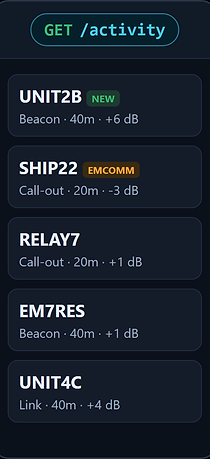
On the air
Every beacon, call-out, broadcast and link the station hears, with band, SNR and locator. Send broadcasts and get receipts.
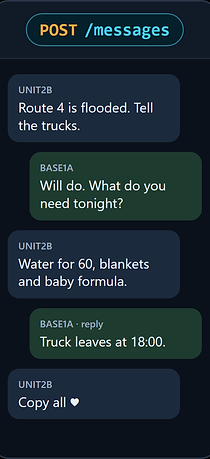
Links and chat
Call a station, send messages and replies, read the chat as it grows, and react with a heart.
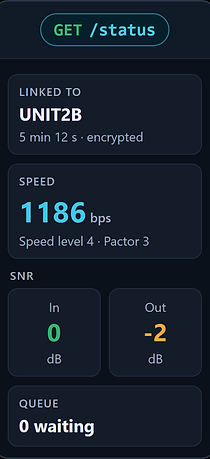
Station status
Link state and activity, speed and SNR in both directions, frequency, beacon, scheduler and queue.

Radio control
Change frequency, answer a move request, and switch the beacon and the scheduler, scanner or ALE.
Try it
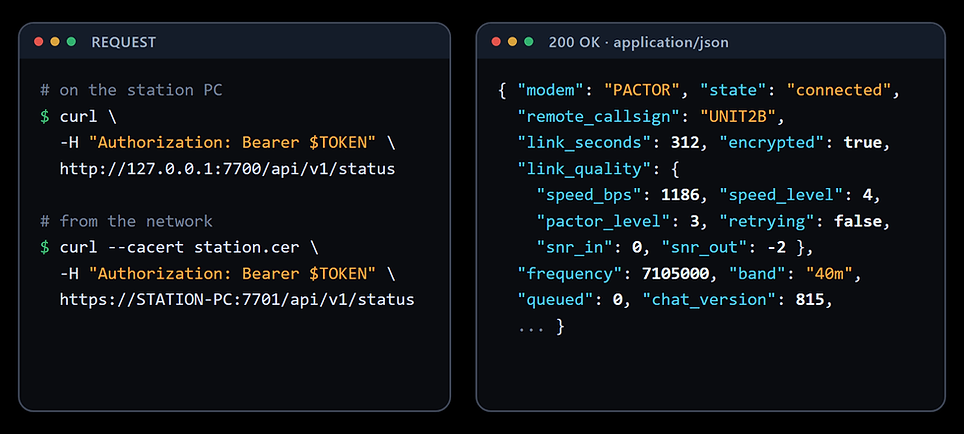
Your first call
One curl command, and the station answers with its whole state as JSON, link quality included.
Errors come back as an HTTP status with {"error": "explanation"}, so your code always knows why.
Secured by design
A token on every request
Encrypted on the network
Local network only