
Setting Up SafecomLink
SafecomLink is plug-and-play. From portable radio setups to full command centers, connecting it to your radio gear is fast and simple.
The SafecomLink "Cookbook"
SafecomLink is built to be hardware-agnostic, supporting over 100 different radio models, ensuring that your existing gear likely already has a seat at the table. While the configurations below are popular starting points, they represent just a fraction of the possibilities.
The "Starter" Setup - Long range (HF)
Ideal for beginners and hobbyists exploring long-distance communication
-
Radio: (tr)uSDX A tiny, low-budget but mighty 5-band low power radio, (or similar).
-
Computer: A Mini PC or an old laptop.
-
Connectivity: Simple USB and 3.5mm audio cables.
-
Modem: VARA-HF Software modem (Free version)
-
Software : SafecomLink Standard Edition

The "Starter" Setup - Short range (VHF/UHF)
Ideal for beginners, hobbyists, and emergency backup kits for local communication
-
Radio: Baofeng UV-5R (or similar UV-series), an affordable dual-band handheld radio (or similar)
-
Computer: A Mini PC or an old laptop
-
Connectivity: Digirig or / USB Programming/Audio Cable
-
Modem: VARA-FM Software modem (Free version)
-
Software : SafecomLink Standard Edition

The "Medium" Setup - Long range (HF)
The most popular choice for reliable, daily communication
-
Radio: Xiegu G90, A 20W SDR transceiver (or similar)
-
Computer: A standard modern laptop or a tablet.
-
Connectivity: Dedicated CAT control cable and audio interface (like the CE-19).
-
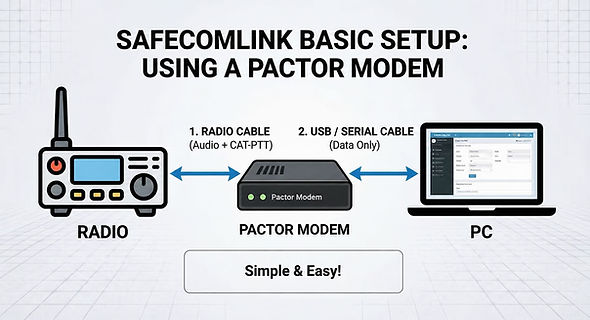
Modem: VARA-HF Software modem (Paid version) or SCS Pactor hardware modem
-
Software : SafecomLink Professional Edition

The "Professional" Setup - Long range (HF)
The perfect balance of power, reliability, and extreme simplicity
-
Radio: Icom IC-7300: A 100W HF SDR with a touch-screen (or similar)
-
Computer: A high-performance Modern Laptop or a Table
-
Connectivity: One Single USB Cable
-
Modem: VARA-HF Software modem (Paid version) or SCS Pactor hardware modem
-
Software : SafecomLink Professional Edition

The "Military Grade" Setup - Long range (HF)
Built for extreme conditions and mission-critical reliability
-
Radio: Harris RF-7800H-MP, The gold standard for tactical wideband HF communication
-
Computer: A fully ruggedized military laptop
-
Connectivity: Military-grade serial/audio interface cables
-
SCS Pactor hardware modem
-
Software : SafecomLink Enterprise Edition

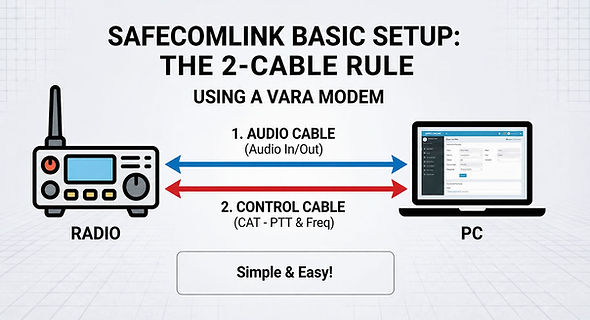
Connectivity: The "Two-Cable" Rule
No matter which radio you choose, the connection to your PC usually comes down to just two simple paths:
1. The Audio Cable:
This handles the "sound" of the data. It takes the audio OUT of your radio into the PC's microphone jack, and sends the PC's audio IN to the radio to be transmitted.
2. The Control (CAT) Cable:
This is the brain of the operation. It tells your PC that your radio is a COM-Port. Through this cable, SafecomLink automatically handles:
- PTT (Push-To-Talk): No manual button pressing needed.
- Frequency Changes: Change the radio's channel directly from the software.
Radio Licensing
Before you hit "Transmit," remember that operating on most HF/VHF/UHF frequencies requires a valid Radio License. Depending on your region and the frequencies you intend to use (Amateur, Commercial, or Government), ensure you have the proper authorization to operate.