SafecomLink V16.1: Live map, RUP-1 beacons and much more!

Hello SafecomLinkers and PACTOR users!
V16.1 is a point release, but don't let the number fool you. The big one is a map. Open it and you can watch the network work: beacons arriving, links forming, broadcasts going out, each one drawn on the map the moment your station hears it.
DR-9400 owners also get RUP-1 beacons, and anyone running a multi-node cluster gets a handful of changes that came straight out of busy real-world setups.
Three new features, six improvements and three fixes. Here is what changed.
📢 Introducing: A live activity map
See Beacons, Call-Outs, Links and Broadcasts on a world map. Pick a time window, and filter by band. Stations in Emergency (EmComm) mode and stations sending Alerts are highlighted so they stand out from the crowd.
Leave it open and it keeps itself current, adding new beacons, links and broadcasts as they come in. Right-click any station for the same actions you already use in the Beacons list, like Connect and Lookup. You can also keep the map always on top of your other windows.
Please note: only stations with a known location (grid locator) appear on the map.

📢 Introducing: RUP-1 beacons on the DR-9400
Your beacons can now be transmitted in Robust Unproto, or simply RUP, the PACTOR modem's new toughest broadcast mode, designed for poor conditions and signals as weak as -21 dB SNR.
This feature was developed by SCS in collaboration with SafecomLink to address the needs of weak-signal communications.
Please note: You must upgrade your DR-9400 firmware to the latest version, 1.01.00, to use RUP. Here is the SCS download page.
Older modems can't decode RUP, so nobody gets left out: a DR-9400 station can beacon in RUP and Unproto at the same time. Go to Settings, then Pactor, and set the Beacon protocol to "BOTH" (RUP + Unproto).

📢 Introducing: Know when a station is scanning
Stations now announce in their beacons whether their frequency scanner is running, and the Beacons list shows it at a glance.
Why it matters: a scanning station hops between frequencies. If you call it and get no answer, it may simply be listening somewhere else for a moment. Give it a few more connection attempts and it will usually come back around to yours.

Improvements
A clearer virtual panel (DR-9400)
The virtual panel now spells out what the modem is doing, with statuses like CONNECTING:XXX, LINKED:XXX and SENDING BEACON. It also shows whether SafecomLink is connected to the modem at all.

Names for cluster instances
Give each cluster instance a name that means something, like "20m Node". The name shows up during inquiry operations and on the new map.
Configurable database lock time
When a cluster gets really busy, the shared database can become a bottleneck. You can now give each instance more time to get access before it gives up.

Last Heard, grouped by node
In a cluster, the Last Heard view now groups stations by the node that heard them.

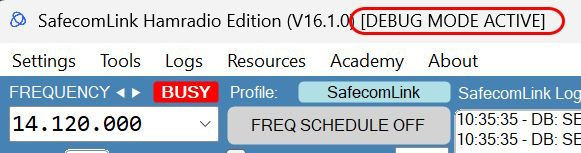
Debug Mode indicator
When Debug Mode is on, the application header now says so clearly.
The GPS coordinates in the bottom strip take up less room.
Get V16.1
Upgrading takes about a minute.
Download the installer and run it.
Point it at the folder where your SafecomLink already lives.
That is it. Your settings and your history stay exactly where they are.
As always, we are around if you need us. Come and say hello on the forum, the Facebook group, Telegram, or the Groups.io community. And if the map shows you something interesting, tell us about it.
Bug fixes
AI engine: when the engine hits an error and cannot answer, the station on the other end is now told, instead of being left waiting.
Cluster: PTT now reliably comes back on, where it could occasionally stay disabled.
Beacon settings: the "Digipeat via" option has been removed, since it never applied to PACTOR.
73, the SafecomLink team