SafecomLink for Pactor V15 is here! with Real-Time "Retrying" Monitoring, Station-to-Station Exchange Through a Cluster, Smart Message Abortion, Default Email Gateway Reply-To Address, and much more!
- SafecomLink

- Jul 11
- 6 min read
Hello SafecomLinkers and PACTOR users!
We are excited to announce the release of SafecomLink V15, packed with new features, enhancements, and performance improvements.
Yes, we know… what else can you possibly add to SafecomLink when it already has so much?
Well, the answer is simple: we keep listening.
This version is packed with a wide range of improvements and refinements directly driven by your feedback and feature requests.
Many of the enhancements you’ll see here came straight from users in the field pushing the system, testing its limits, and asking for exactly what they needed.
So keep those requests coming!
This version includes new features that are not backward compatible, so it is important that everyone upgrades to avoid compatibility issues.
Take a deep breath... and let's dive in!
📢 Introducing: Real-Time "Retrying" Monitoring
Until now, you could monitor the current PACTOR level and speed in real time.
However, when no traffic was visible, it was often unclear whether no new data was being exchanged or whether the modem was simply retrying the transmission.
In addition to the real-time speed indicator on the bottom status bar, SafecomLink V15 now also displays when the modem is retrying.
This gives you immediate insight into what the modem is doing and eliminates the guesswork when traffic appears to pause.

📢 Introducing: Real-Time Station-to-Station Exchange Through the Cluster
The SafecomLink Cluster introduces a breakthrough in HF ARQ communication by evolving traditional point-to-point links into a multi-node, cross-band system.
Multiple SafecomLink instances now operate as a synchronized “connected brain,” bridging traffic in real time across different HF bands. This enables seamless cross-band routing, allowing stations with no shared propagation to communicate instantly through a cluster node.
Most importantly, the Cluster enables the first-ever multi-party ARQ live chat on HF, breaking the long-standing 1-to-1 limitation of ARQ protocols and opening the door to dynamic group communication and coordinated off-grid operations.
When connected to a cluster, you are now automatically notified and can access new cluster intelligence features:
Retrieve a list of all active cluster instances and their operating frequencies using the <CIR> tag
Retrieve a list of currently connected stations using the <CRR> tag
If you see a station you wish to contact, you can instantly reach them via VMail or start a live exchange. For example:
SM NC3Z: Hi buddy! Nice to see you on the cluster!This message is delivered directly to NC3Z, who can respond in the same way.
Want to start a group chat with all cluster members? Simply send:
SM ALL: Hi all, let’s have a group chat!
This has been a challenging engineering milestone, and we are very proud of the result.
At SafecomLink, we remain committed to continuing to evolve and expand the Cluster functionality in upcoming versions.
📢 Introducing: Smart Message Abortion
One of the most frustrating aspects of operating PACTOR has always been the inability to abort a message once it is already being transmitted.
This becomes especially painful during large file transfers, where you may have to wait several minutes before you can regain control.
SafecomLink V15 introduces CLEAR, a smart message abortion feature.
You can now abort any message currently being transmitted. The remote station is automatically notified that the transmission was aborted, ensuring they know they received only a partial message.
Please note: The receiving station must be running V15 to support this feature. Otherwise, the connection will fail.

📢 Introducing: Per-Instance TUNE Level Memory (PSKA/FSKA)
SafecomLink has always remembered your TUNE levels (FSKA/PSKA) for each band. Every time you switch bands, it automatically restores the last TUNE levels you used on that band.
However, operators running multiple SafecomLink instances, especially cluster operators, often ran into conflicts because all instances shared the same TUNE settings.
Not anymore!
With SafecomLink V15, the last-used TUNE levels (FSKA/PSKA) are now stored per band, per SafecomLink instance. Each instance maintains its own independent TUNE profile, providing complete separation and eliminating unwanted interference between multiple running instances.


📢 Introducing: CS/TX Delay at the Profile Level
YES! Finally! you no longer need to rely on a single modem memory setting.
When operating multiple rigs and switching between SafecomLink profiles, you can now assign dedicated CS/TX Delay (CSD/TXD) settings per instance.
No more manual adjustments and no more configuration juggling.
Simply switch to a different SafecomLink profile, and the correct timing settings are applied automatically.

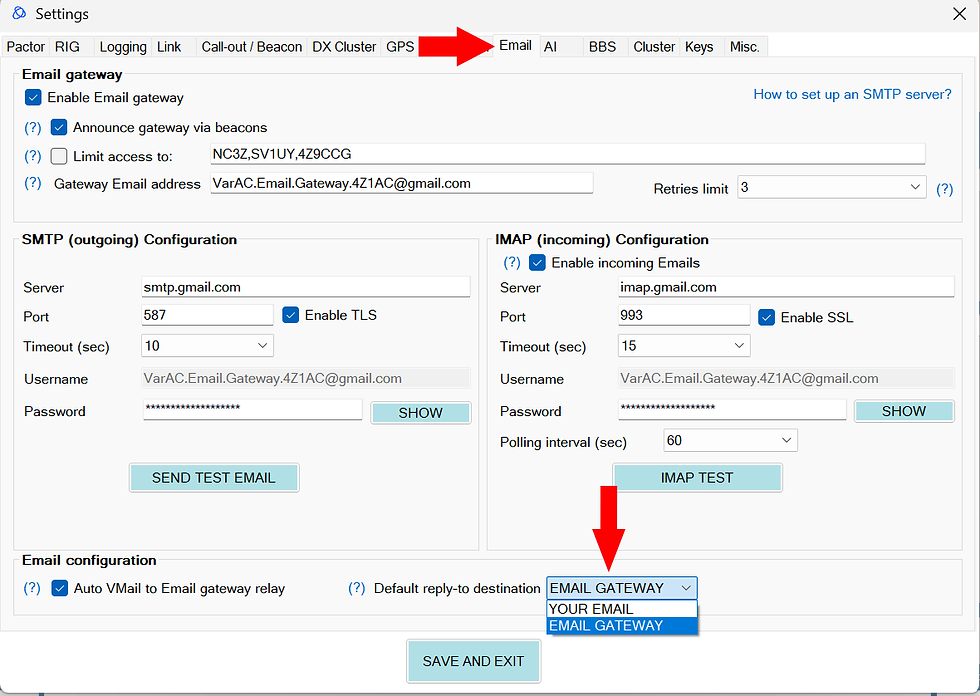
📢 Introducing: Default Email Gateway Reply-To Address
For those who heavily use the SafecomLink Email Gateway, this one is for you!
You can now define a default Reply-To behavior, eliminating the need to set it manually every time you compose a VMail through the Email Gateway.
Simply select your preferred default in the settings menu, and you’re done.
From now on, every VMail sent via the Email Gateway will automatically include your chosen Reply-To configuration, pre-selected according to your preferences.
But that’s not all!
SafecomLink V15 includes many additional improvements and bug fixes across the system.
Here are the highlights:
Additional Improvments:
QSY Grace Period: Introduced a grace period between a QSY and a beacon to allow extra time for frequency changes. This prevents accidental beaconing on a slot immediately after a QSO ends.Enhanced TEST PTT (CAT Mode): Added support for comma-concatenated commands within the TEST PTT settings.
Double-click Disconnect Modem Protection: Click twice on “DISCONNECT MODEM” to disconnect the modem. This acts as a safety trigger to prevent accidental disconnection.
JHOST5 Modem Communication Protocol: The SafecomLink–modem connection is now CRC-protected by default to prevent COM port errors, USB corruption, and RF interference
Time & Date Sync: The Pactor modem’s time and date are now automatically set upon connection, greatly improving the accuracy of modem-side log analysis.
UI Tooltips: Added a missing helper tooltip for the Pactor Control Type setting.
Academy & Registry Links: Updated the Academy dropdown menu terminology and added dedicated links for the SafecomLink Academy and Online Registry
Default BBS Directory: If no directory is configured, the default BBS directory now automatically resolves to /bbs under the SafecomLink installation folder.
Enhanced Backups: The backup utility now correctly targets and backs up the actual database file when a custom database file path is in use.
To upgrade from an existing SafecomLink version:
- Download the SafecomLink Installer and run it.
- Select the current folder where your SafecomLink resides.
- The installer will keep your existing settings and history.
Just reminding you all that we are always there for you on our Forum, our Facebook group, Telegram group, and our Groups.io community.
73, Irad 4Z1AC & the SafecomLink team.
Bug Fixes
Datastream Scrolling: Fixed a crash (FirstDisplayedScrollingRowIndex property cannot be set to an invisible row) when scrolling down the datastream or adding new lines to the datastream/broadcast sections.
VMail Composer Cursor: Fixed an annoying behavior where the cursor would jump to the end of the field after every keystroke when editing a callsign or email during VMail composition.
Window Scaling: Enlarged the "VMail Relay Alert" popup to prevent content from being cut off on screens with scaling set above 100%.
Log Text Coloring: Resolved a frequent log warning: WARNING: Unable to color sent text in the 'currently sending' section. Source array was not long enough which occurred near the completion of a message transmission.
Smart Abort Actions: Fixed an issue where clicking Abort during an active time slot (without an established connection) mistakenly triggered the "QSY Back to CF" popup.
Legacy Modem Disconnections: Fixed an issue where clicking Abort during a connection attempt on older modems required a secondary click on "DISCONNECT" to fully terminate the attempt.
Legacy Modem Parameter Initialization: Fixed a bug where parameters exclusive to the DR-9400 modem were being pushed to older, unsupported models (X0, U30, PDT 0) during initialization.
Security & Encryption: Resolved an issue where AES keys were not being properly reset when encryption was disabled.
Beacon Band Coloring: Fixed a bug where a beacon with an indeterminate band was incorrectly highlighted in orange ("Known callsign, new band"). It will no longer be colored.
Cluster Eviction Lock: Resolved a critical bug where a cluster instance experiencing a temporary database lock while updating its keep-alive status would be permanently evicted from the cluster after 30 seconds (requiring a restart).
DB Fixer Ghost Column: Fixed a false positive error where the DB Fixer erroneously claimed the is_varac_master column was missing.
Permissions Safeguard: Fixed an unhandled exception that occurred when a user attempted to send a file without proper disk read/write permissions.
Recover after crash during a link: If SafecomLink crashes during an active link, restarting it may fail until the modem is manually restarted.